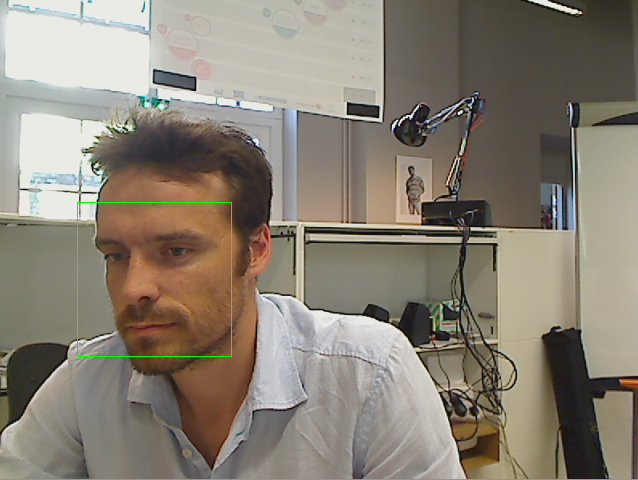
Face Detection
Do I see human faces? How many? Where?
Getting Started
Using Angus python SDK:
# -*- coding: utf-8 -*-
import angus.client
from pprint import pprint

conn = angus.client.connect()
service = conn.services.get_service('face_detection', version=1)
job = service.process({'image': open('./macgyver.jpg', 'rb')})
pprint(job.result)
Input
The API takes a stream of 2d still images as input, of format jpg or png, without constraints on resolution.
Note however that the bigger the resolution, the longer the API will take to process and give a result.
The function process() takes a dictionary as input formatted as follows:
{'image' : file}
image: a pythonFile Objectas returned for example byopen()or aStringIObuffer.
Output
Events will be pushed to your client following that format:
{
  "input_size" : [480, 640],
  "nb_faces" : 2,
  "faces" : [
              {
                "roi" : [345, 223, 34, 54],
                "roi_confidence" : 0.89
              },
              {
                "roi" : [35, 323, 45, 34],
                "roi_confidence" : 0.56
              }
            ]
}
input_size: width and height of the input image in pixels (to be used as reference toroioutput.nb_faces: number of faces detected in the given imageroi: contains[pt.x, pt.y, width, height]where pt is the upper left point of the rectangle outlining the detected face.roi_confidence: an estimate of the probability that a real face is indeed located at the givenroi.
Code Sample
requirements: opencv2, opencv2 python bindings
This code sample retrieves the stream of a web cam and display in a GUI the result of the face_detection service.
# -*- coding: utf-8 -*-
import cv2
import numpy as np
import StringIO

import angus.client

def main(stream_index):
    camera = cv2.VideoCapture(stream_index)
    camera.set(cv2.cv.CV_CAP_PROP_FRAME_WIDTH, 640)
    camera.set(cv2.cv.CV_CAP_PROP_FRAME_HEIGHT, 480)
    camera.set(cv2.cv.CV_CAP_PROP_FPS, 10)

    if not camera.isOpened():
        print("Cannot open stream of index {}".format(stream_index))
        exit(1)

    print("Video stream is of resolution {} x {}".format(camera.get(3), camera.get(4)))

    conn = angus.client.connect()
    service = conn.services.get_service("age_and_gender_estimation", version=1)
    service.enable_session()

    while camera.isOpened():
        ret, frame = camera.read()

        if not ret:
            break

        gray = cv2.cvtColor(frame, cv2.COLOR_BGR2GRAY)
        ret, buff = cv2.imencode(".jpg", gray,  [cv2.IMWRITE_JPEG_QUALITY, 80])
        buff = StringIO.StringIO(np.array(buff).tostring())

        job = service.process({"image": buff})
        res = job.result

        for face in res['faces']:
            x, y, dx, dy = face['roi']
            cv2.rectangle(frame, (x, y), (x+dx, y+dy), (0,255,0))

        cv2.imshow('original', frame)
        if cv2.waitKey(1) & 0xFF == ord('q'):
            break

    service.disable_session()

    camera.release()
    cv2.destroyAllWindows()

if __name__ == '__main__':
    ### Web cam index might be different from 0 on your setup.
    ### To grab a given video file instead of the host computer cam, try:
    ### main("/path/to/myvideo.avi")
    main(0)